> For the complete documentation index, see [llms.txt](https://docs.rierino.com/llms.txt). Markdown versions of documentation pages are available by appending `.md` to page URLs; this page is available as [Markdown](https://docs.rierino.com/devops/branching-and-migration/managing-branches.md).
# Managing Branches
Built-in branch management features allow co-development on Rierino within distributed environments
## Rierino Approach to Branching
In Rierino, branching is designed to provide more flexibility to developers and end users, compared to traditional GitHub-like branching approaches.
| Traditional Branching | Rierino Branching |
| -------------------------------------------------------------------------------------------------------------------- | --------------------------------------------------------------------------------------------------------------------- |
| Separate branches require separate deployments of instances running on different versions | All branches can run on a single instance concurrently, without the need for new deployments |
| Testing / using separate branches require switching between different deployment domains | Users can use different branches simply setting a header parameter in API calls or making a switch on admin UI |
| Updates on branches require rebuilding and redeploying branch assets | Updates on branches take affect immediately without the need to redeploy or restart services |
| Developers work on isolated or local environments for branches, typically missing access to some development systems | Branches are developed directly on the online development environment, with full and secure access to allowed systems |
Eliminating the need for deploying branches as separate instances simplifies operations while decreasing cost of infrastructure.
## Using Branches
Active branches can be accessed through the UI by users as well as APIs for headless and programmatical use cases.
### From Admin UI
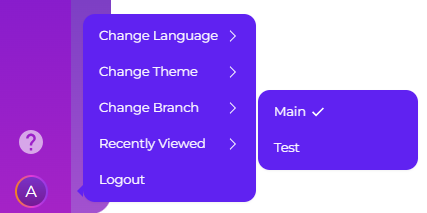
Users can switch between branches using the profile menu, unless it is disabled in admin UI with NO\_BRANCH\_PROVIDER=true environment variable. "Main" option represents the branch that is active by default. Switching to any other branch automatically adds a \[branch] prefix to browser tab names, to help users avoid switching to a wrong branch by mistake.
Switching to a branch activates all 'branched' assets for the user, including UI elements as well as backend APIs, utilizing the version that is created under given branch or the main version if that doesn't exist.
### From API
API calls to gateways can select specific branches, unless the gateway has this feature disabled with rierino.gateway.allowBranch=false property setting. There are 2 alternative ways of triggering APIs of a specific branch:
* **Using Channel Naming:** By appending @\[branch] suffix to any gateway channel (e.g. /api/request/rpc\@test/Ping), users can trigger saga flows on specific branches
* **Using Branch Header:** By sending X-Branch=\[branch] header in requests (e.g. X-Branch=test), users can trigger saga flows on specific branches
## Creating Branches
A new branch can be created from devops application simply by giving it a name and description. Once the branch is created, development can begin on it, simply by switching to it on the admin UI.
### Developing on Branches
During development with a selected branch (such as the user editing a saga), the following scenarios are possible:
* **No existing record:** If the user is creating an asset, such as saga, which doesn't exist in the main or current branch, it is directly created on the current branch
* **Main branch record only:** If the record being edited by the user only exists in main branch, in other words was never edited on the current branch before, it is cloned from main with the changes applied by the user on the current branch
* **Current branch record:** If the record was already edited by the user before on the current branch, changes are applied directly on that record
| Main Branch | Current Branch \[test] | User Sees | User Creates/Edits |
| ----------- | ---------------------- | --------------- | ------------------ |
| - | - | - | test\@new-0001 |
| saga-0001 | - | saga-0001 | test\@saga-0001 |
| saga-0001 | test\@saga-0001 | test\@saga-0001 | test\@saga-0001 |
{% hint style="info" %}
In database collections, branch record ids are prefixed with \[branch]@ and include data.branch details for reference.
{% endhint %}
### Branchable Operations
Any asset, including business domain records, can be branch enabled, which allows reading and writing different versions of these records based on the current branch of a user. Following technical domains have branching enabled by default:
* **Sagas:** Allowing branching of API flows, with SagaEventHandler having built-in support
* **Queries:** Allowing branching of operational and analytical queries, with QueryEventHandler having built-in support
* **GenAI Models:** Allowing branching of AI agents, with LangChainModelEventHandler having built-in support
* **Codes:** Allowing branching of scripts and templates, with ScriptLoadedEventHandler, OpenHFTEventHandler and TemplateEventHandler having built-in support
* **Apps:** Allowing branching of app screens
* **UIs:** Allowing branching of UI screens
{% hint style="info" %}
Rule engines do not utilize branching as using separate rule domains for development simplifies management.
{% endhint %}
{% hint style="warning" %}
It is important to note that for some assets like Sagas, if the branch record becomes inactive (e.g. status = Passive), and the main branch has an active record, the main branch implementation will continue to execute for the branch as well (i.e. branch record becomes 'invisible' instead of 'blocking').
{% endhint %}
In case required for a specific business domain, branching can be enabled using the following configurations:
* Making its state manager 'writeBranched', which allows storing branch versioned copies with write operations
* Making its source 'writeBranched' ensuring admin UI write operations take into account branch affect on instance versioning
* Making item editors which use this source 'branched' to display only the active branch records
{% hint style="info" %}
In almost all cases, branching is only used for technical domains, with business users utilizing versioned record histories instead.
{% endhint %}
## Merging Branches
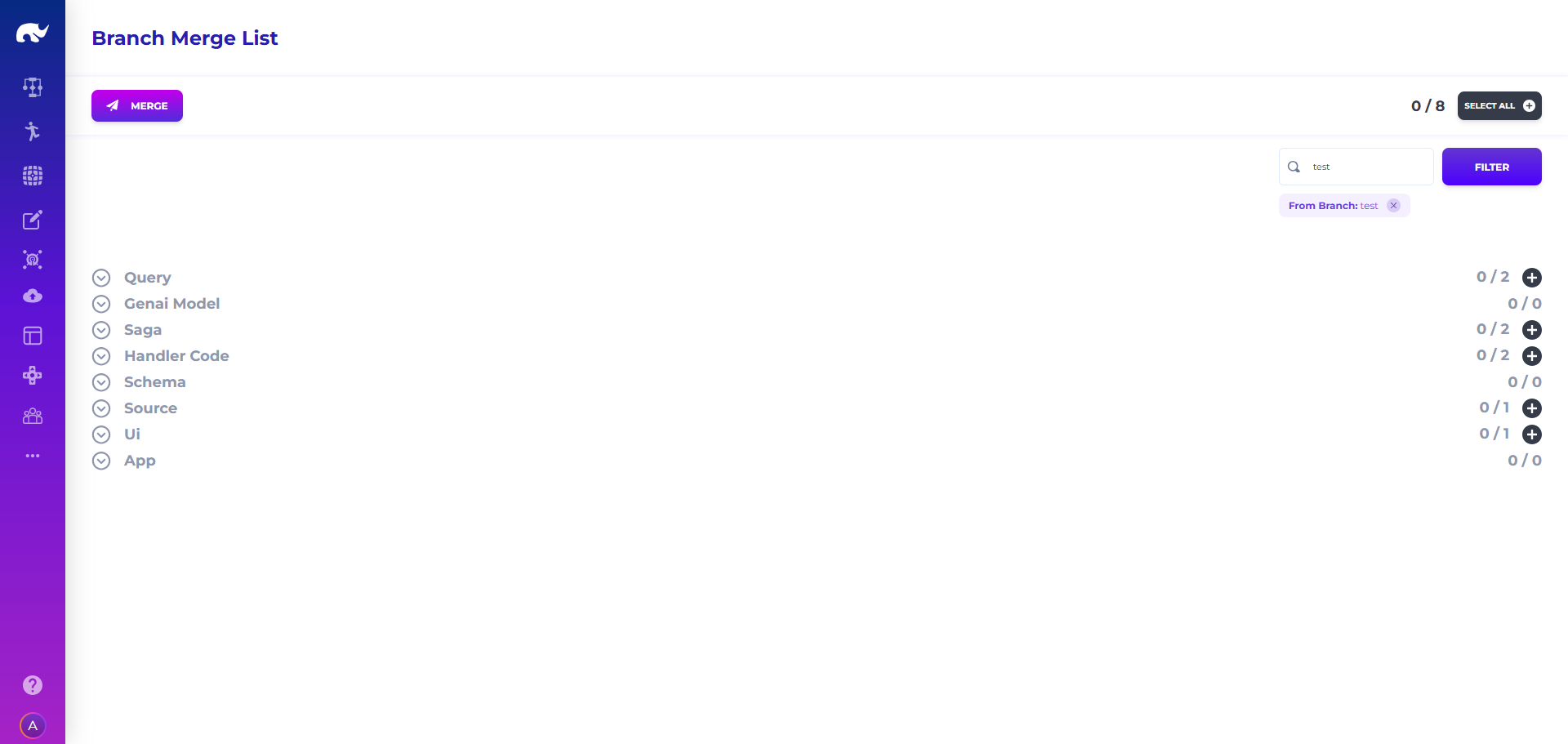
Once development and testing is done on a branch, it can be merged onto the main branch through devops application using the following screen:
Similar to migration management, branch merges allow selection of specific assets (such as a single API or query) for the merge operation, giving more granular control in this process.
{% hint style="info" %}
Merge operation makes a call to "merge\_branch\_assets-0001" saga, which can be customized if required (such as removing merged branch assets from the database).
{% endhint %}
---
# Agent Instructions
This documentation is published with GitBook. GitBook is the documentation platform designed so that both humans and AI agents can read, navigate, and reason over technical content effectively. Learn more at gitbook.com.
## Querying This Documentation
If you need additional information that is not directly available in this page, you can query the documentation by asking a question.
Perform an HTTP GET request on the following URL with the `ask` and `goal` query parameters:
```
GET https://docs.rierino.com/devops/branching-and-migration/managing-branches.md?ask=&goal=
```
`ask` is the immediate question: it should be specific, self-contained, and written in natural language.
`goal` is what the user is ultimately trying to achieve, the reason they need the answer. Sharing it helps GitBook give you a better, more relevant answer. A goal is most helpful when it describes the outcome the user wants rather than restating the question. For example, with `ask=how do I create an API token`, a goal like `automate deployments from our CI pipeline` lets GitBook tailor the answer to that use case.
The response will contain a direct answer to the question and relevant excerpts and sources from the documentation.
Use this mechanism when the answer is not explicitly present in the current page, you need clarification or additional context, or you want to retrieve related documentation sections.