> For the complete documentation index, see [llms.txt](https://docs.rierino.com/llms.txt). Markdown versions of documentation pages are available by appending `.md` to page URLs; this page is available as [Markdown](https://docs.rierino.com/examples/in-depth-exercise/to-do-list-gateway.md).
# To-do List Gateway
Expose the to-do CRUD runner through an API gateway by creating a channel mapping. You will assign a public path and verify external access to the runner endpoints.
This exercise exposes the to-do runner outside the cluster. You will create a **Gateway Channel** that forwards requests to the CRUD runner service.
### Before you start
* You completed [To-do List Runner](/examples/in-depth-exercise/to-do-list-runner.md) and the runner is deployed.
* You can access the [Devops](/devops/devops-overview.md) app.
* You know your API base URL: `https://[YOUR_ADMIN_API_DOMAIN]`.
* You have a gateway instance to target (example: `admin-prod`).
{% hint style="warning" %}
This guide configures the endpoint as **public** for simplicity. For real environments, require auth and limit paths.
{% endhint %}
### What you’ll build
* **Gateway Channel ID**: `todo_crud`
* **Public request path**: `GET /api/request/todo_crud/todo`
* **Target runner base URL** (example, internal):\
`http://runner-spring-example-0001-service.admin-backend.svc.cluster.local:1235`
* **Runner target prefix**: `/api/todo`
{% stepper %}
{% step %}
### Open the Gateway Channel screen
Open the [Gateway Channels](/devops/api-gateway-and-security/gateway-servers/gateway-channels.md) screen from the Devops app.
Unless you changed routing, the UI is at `https://[YOUR_ADMIN_UI_DOMAIN]/app/devops/common/gateway_channel`.
Gateway Channel Screen
{% endstep %}
{% step %}
### Create a new channel (todo\_crud)
Click **CREATE NEW** and assign the channel ID:
* `todo_crud`
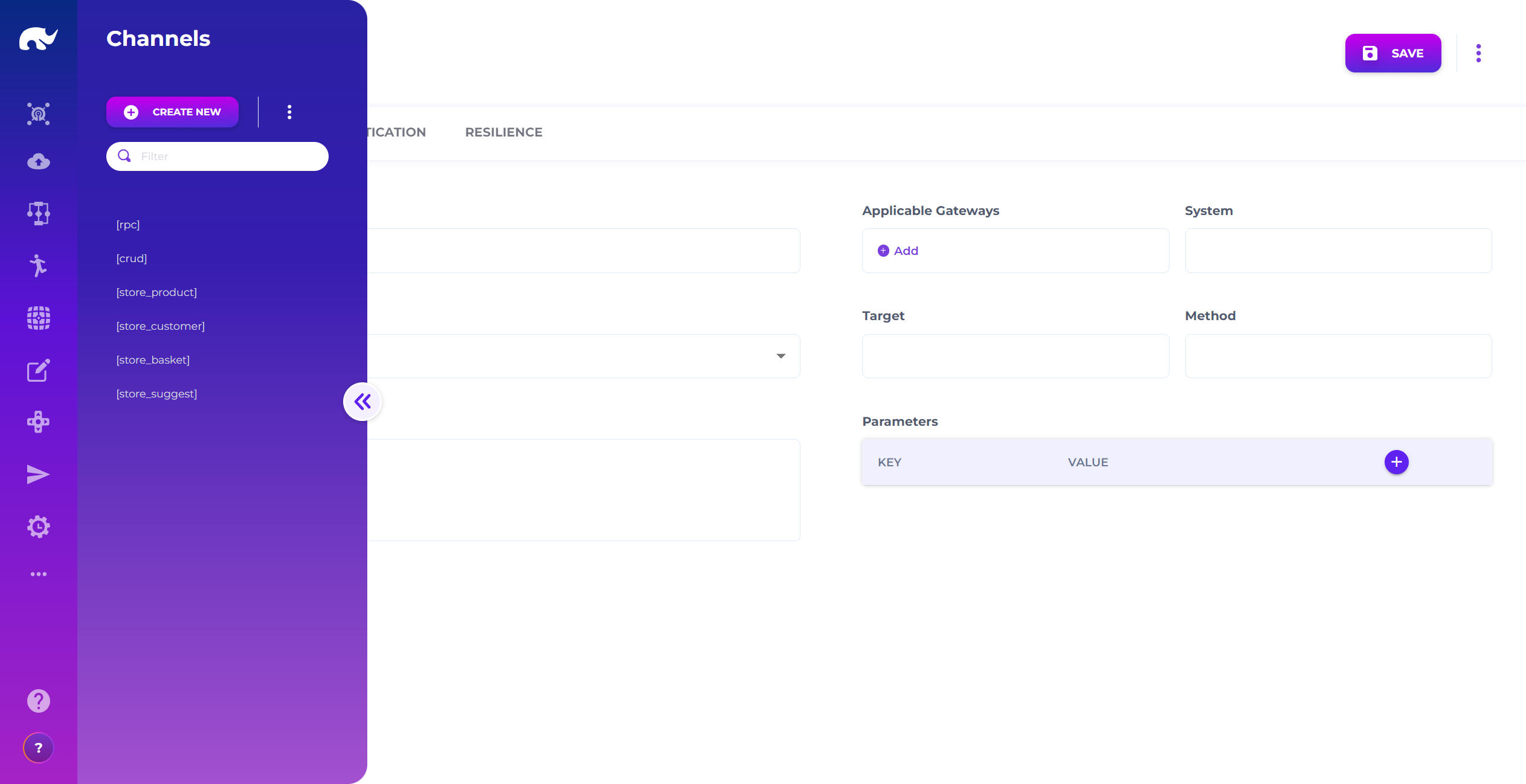
Fill in the channel details and save:
Gateway Channel Definition Screen
* **DEFINITION**
* **Channel Name:** `Todo`
* **Channel Status:** `ACTIVE`
* **Description:** `CRUD path to todo list runner`
* **Applicable Gateways:** `admin-prod`
* **System Executor:** `CRUD`
* **System Parameters**
* **Key:** `server.baseUrl`
* **Value:** `http://runner-spring-example-0001-service.admin-backend.svc.cluster.local:1235`
* **Target:** `/api/todo`
* **AUTHENTICATION**
* **Path Authentications:** `{ "*": { "isPublic": true } }`
This mapping means:
* The gateway receives requests under the channel name (`todo_crud`).
* It forwards the request to the runner service at `server.baseUrl`.
* It prefixes the forwarded path with `/api/todo`.
So a request to:
* `GET https://[YOUR_ADMIN_API_DOMAIN]/api/request/todo_crud/todo`
is forwarded to:
* `GET http://...:1235/api/todo/todo`
{% endstep %}
{% step %}
### Wait for reload (or trigger it manually)
Most environments auto-reload gateway config after a short interval.
If you need to force a reload, call:
```
POST https://[YOUR_ADMIN_API_DOMAIN]/api/control/system/example-admin
POST https://[YOUR_ADMIN_API_DOMAIN]/api/control/channel/todo_crud
```
{% hint style="info" %}
If your gateway is configured differently, your control endpoints or system name may differ. Keep the idea: reload the gateway system, then reload the channel.
{% endhint %}
{% endstep %}
{% step %}
### Test the gateway endpoint
List to-do items through the public gateway endpoint:
```
GET https://[YOUR_ADMIN_API_DOMAIN]/api/request/todo_crud/todo
```
Expected result:
* HTTP `200`
* A JSON array containing any records you created earlier
If you get an empty list, create one item first (either via direct runner testing or by sending a `POST` through this same gateway channel).
{% endstep %}
{% endstepper %}
### Next step
Build an admin screen on top of this endpoint in [To-do List UI](/examples/in-depth-exercise/to-do-list-ui.md).
### Troubleshooting
* **404 on `/api/request/todo_crud/...`**: the channel ID is wrong or not active. Confirm it is saved and `ACTIVE`.
* **502/504**: `server.baseUrl` is unreachable from the gateway. Verify the service name, namespace, and port (`1235`).
* **401/403**: authentication is enforced by your gateway policy. Update **Path Authentications** or provide the required token.
* **Old behavior after edits**: trigger a manual reload using the control endpoints (or wait for the reload interval).
---
# Agent Instructions
This documentation is published with GitBook. GitBook is the documentation platform designed so that both humans and AI agents can read, navigate, and reason over technical content effectively. Learn more at gitbook.com.
## Querying This Documentation
If you need additional information that is not directly available in this page, you can query the documentation by asking a question.
Perform an HTTP GET request on the following URL with the `ask` and `goal` query parameters:
```
GET https://docs.rierino.com/examples/in-depth-exercise/to-do-list-gateway.md?ask=&goal=
```
`ask` is the immediate question: it should be specific, self-contained, and written in natural language.
`goal` is what the user is ultimately trying to achieve, the reason they need the answer. Sharing it helps GitBook give you a better, more relevant answer. A goal is most helpful when it describes the outcome the user wants rather than restating the question. For example, with `ask=how do I create an API token`, a goal like `automate deployments from our CI pipeline` lets GitBook tailor the answer to that use case.
The response will contain a direct answer to the question and relevant excerpts and sources from the documentation.
Use this mechanism when the answer is not explicitly present in the current page, you need clarification or additional context, or you want to retrieve related documentation sections.